MCP开发入门

MCP以统一的方式让大语言模型能自动调用程序,极大扩充了大语言模型的应用范围,是一门非常火爆的技术。

本文简要介绍在主流技术栈中怎么开发MCP服务端和客户端。

原理

MCP(Model Context Protocol,模型上下文协议)是一个是LLM(大语言模型)能够与外部工具和数据源交互的协议。

简单理解:LLM通常只与文本打交道,可以使用系统提示词为其制定规则,然后向其输入直接对话的文本(用户提示词),从而让LLM在预置的规则下响应用户对话。由于LLM只与文本打交道,而用户很多工作是需要通过程序来实现的,LLM没法直接调用这些程序,所以就出现了各种旨在让LLM执行程序的技术,MCP可为当前的佼佼者。这些技术的功能大同小异,让LLM根据用户的自然语言输入,自动填充方法参数,然后执行方法获得返回数据,LLM进一步分析返回数据,整理得到用户希望的最终答案。

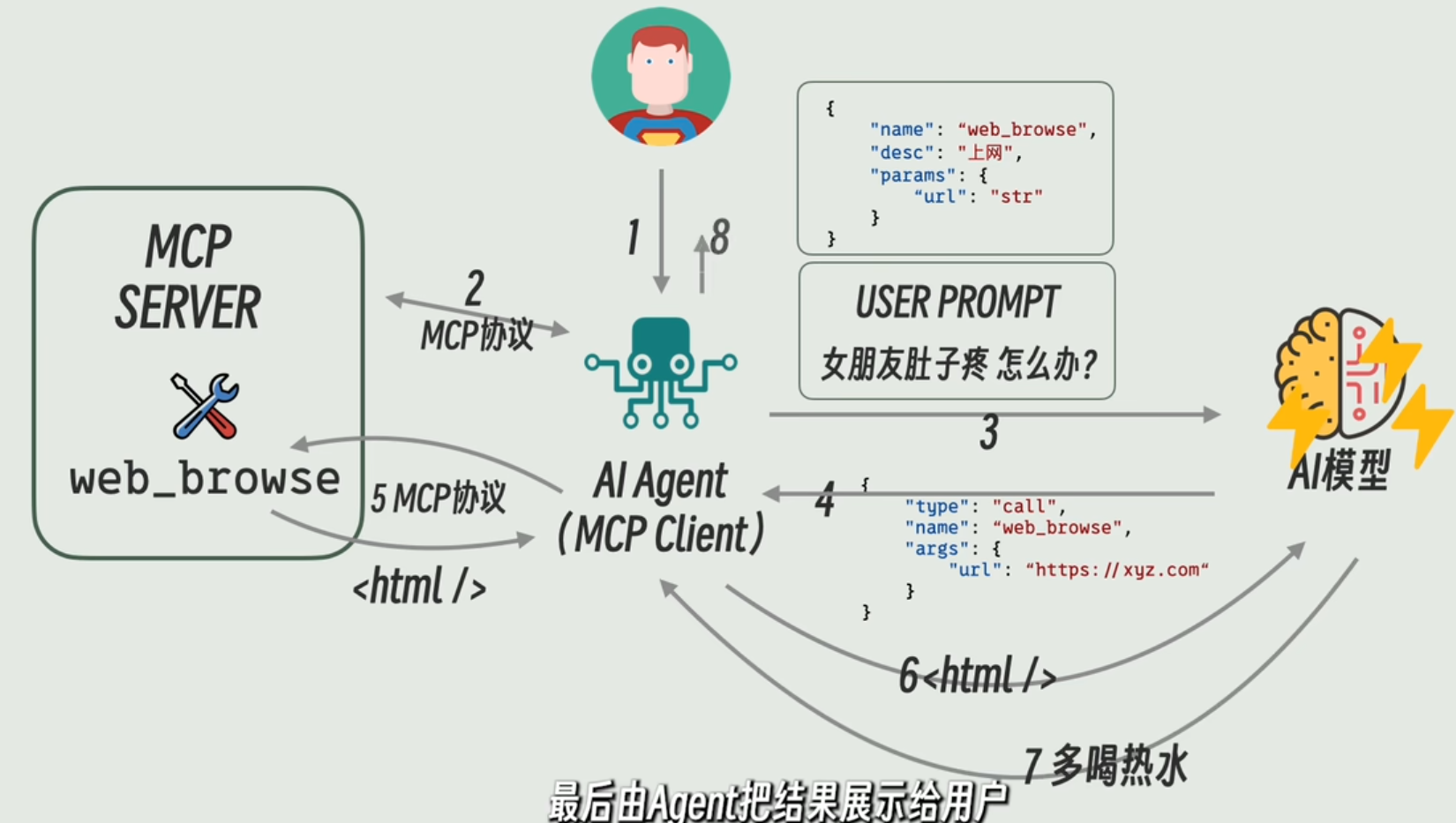
网络上有很多制作优良的图片可以很直观体现MCP的大致原理,下图是其一:
(来自网络,侵权联删)

基本流程是:

  • 用户以自然语言提问;
  • MCP客户端从MCP服务端获取所有的工具元数据;
  • MCP客户端将工具元数据作为提示词,同用户提示词一起发送给LLM;
  • LLM分析出需要调用哪些MCP工具,并确定这些工具的传参;
  • MCP工具被调用,获得返回信息,MCP客户端将工具返回值发送给LLM;
  • LLM结合工具返回信息整理得到最终答案,返回给用户。

以下MCP客户端开发的流程也非常好地体现了这个流程。

服务端开发

Python

依赖以下包,有些是为了设置服务跨域引入的:

1
2
3
4
5
6
7
dependencies = [
"fastapi>=0.135.1",
"httpx>=0.28.1",
"mcp[cli,http]>=1.2.1",
"openai>=1.0.0",
"python-dotenv>=1.0.0",
]

主程序:

1
2
3
4
5
6
7
8
9
10
11
12
13
14
15
16
17
18
19
20
21
22
23
24
25
26
27
28
29
30
31
32
33
34
35
36
37
38
39
40
41
42
43
44
45
46
47
48
49
50
51
52
53
54
55
56
57
58
59
60
61
62
63
64
65
66
67
68
69
70
71
72
73
74
75
76
77
78
from pathlib import Path
from mcp.server.fastmcp import FastMCP
from starlette.middleware.cors import CORSMiddleware

class CustomFastMCP(FastMCP):
def sse_app(self, mount_path: str | None = None):
# Get the original app
app = super().sse_app(mount_path)

# Add CORS middleware
app.add_middleware(
CORSMiddleware,
allow_origins=["*"], # 允许所有来源,生产环境应该设置具体的域名
allow_credentials=True,
allow_methods=["*"], # 允许所有HTTP方法
allow_headers=["*"], # 允许所有HTTP头
)

return app

def streamable_http_app(self, mount_path: str | None = None):
# Get the original app
app = super().streamable_http_app(mount_path)

# Add CORS middleware
app.add_middleware(
CORSMiddleware,
allow_origins=["*"], # 允许所有来源,生产环境应该设置具体的域名
allow_credentials=True,
allow_methods=["*"], # 允许所有HTTP方法
allow_headers=["*"], # 允许所有HTTP头
)

return app

mcp = CustomFastMCP("Desktop TXT File Counter")


def get_desktop_path() -> Path:
"""Get the desktop path for the current platform."""
home = Path.home()
return home / "Desktop"


def get_txt_files() -> list[Path]:
"""Get all .txt files from desktop."""
desktop = get_desktop_path()

if not desktop.exists():
return []

return sorted(desktop.glob("*.txt"))


@mcp.tool()
def count_desktop_txt_files() -> int:
"""Counts the number of .txt files on desktop."""
return len(get_txt_files())


@mcp.tool()
def list_desktop_txt_files() -> str:
"""Get a list of all .txt filenames on the desktop."""
txt_files = get_txt_files()

if not txt_files:
return "No .txt files found on desktop."

file_list = "\n".join(f"- {file.name}" for file in txt_files)
return f"Found {len(txt_files)} .txt file(s) on desktop:\n{file_list}"


def main():
mcp.run(transport="sse")


if __name__ == "__main__":
main()

C#

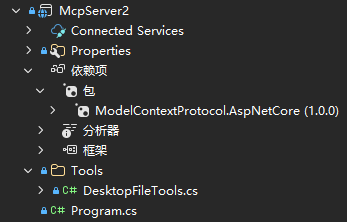
使用ModelContextProtocol.AspNetCore包简化MCP服务端开发:
直接通过工具类名注册MCP工具:

1
2
3
4
5
6
7
8
9
10
11
12
13
14
15
16
17
18
19
20
21
22
23
24
var builder = WebApplication.CreateBuilder(args);

// Add CORS services
builder.Services.AddCors(options => {
options.AddPolicy("AllowAll", policy => {
policy.AllowAnyOrigin()
.AllowAnyMethod()
.AllowAnyHeader();
});
});

// Add the MCP services: the transport to use (http) and the tools to register.
builder.Services
.AddMcpServer()
.WithHttpTransport()
.WithTools<DesktopFileTools>();


var app = builder.Build();
app.UseCors("AllowAll");
app.MapMcp();
app.UseHttpsRedirection();

app.Run();

定义MCP工具,通过注解指定和说明工具方法:

1
2
3
4
5
6
7
8
9
10
11
12
13
14
15
16
17
18
19
20
21
22
23
24
25
26
27
28
29
30
31
32
33
34
35
36
37
38
39
40
41
42
43
44
45
46
47
48
49
50
51
52
53
54
55
56
57
58
59
60
61
62
63
64
65
66
67
68
69
70
71
72
73
74
75
76
77
78
79
80
81
82
83
84
85
86
87
88
89
90
91
92
93
94
95
96
97
98
99
100
101
102
103
104
105
106
107
108
109
110
111
112
113
114
115
116
117
118
119
120
121
122
123
124
125
126
127
128
129
130
131
132
133
134
135
136
137
138
139
140
using ModelContextProtocol.Server;
using System;
using System.ComponentModel;
using System.IO;
using System.Text;

/// <summary>
/// MCP tools for desktop file operations.
/// These tools can be invoked by MCP clients to perform various file operations.
/// </summary>
internal class DesktopFileTools {
[McpServerTool]
[Description("Returns the number of text files on the desktop.")]
public int GetDesktopTextFileCount() {
string desktopPath = Environment.GetFolderPath(Environment.SpecialFolder.Desktop);
string[] textFiles = Directory.GetFiles(desktopPath, "*.txt");
return textFiles.Length;
}

[McpServerTool]
[Description("Returns a list of filenames of text files on the desktop as a single string.")]
public string GetDesktopTextFileNames() {
string desktopPath = Environment.GetFolderPath(Environment.SpecialFolder.Desktop);
string[] textFiles = Directory.GetFiles(desktopPath, "*.txt");
string fileNamesString = string.Empty;
foreach (string file in textFiles) {
fileNamesString += $"{Path.GetFileName(file)}\n";
}

if (!string.IsNullOrEmpty(fileNamesString)) {
fileNamesString = fileNamesString.TrimEnd('\n');
}

return fileNamesString;
}

[McpServerTool]
[Description(
"Creates a .txt file on the desktop with the given filename and random content. Returns the full path of the created file.")]
public string CreateDesktopTextFile(string fileName) {
if (string.IsNullOrWhiteSpace(fileName)) {
throw new ArgumentException("fileName must not be empty", nameof(fileName));
}

// Ensure .txt extension
if (!fileName.EndsWith(".txt", StringComparison.OrdinalIgnoreCase)) {
fileName += ".txt";
}

// Sanitize filename
foreach (var c in Path.GetInvalidFileNameChars()) {
fileName = fileName.Replace(c, '_');
}

string desktopPath = Environment.GetFolderPath(Environment.SpecialFolder.Desktop);
string fullPath = Path.Combine(desktopPath, fileName);

var rand = Random.Shared;
int lines = rand.Next(5, 21);

var sb = new StringBuilder();
for (int i = 0; i < lines; i++) {
sb.AppendLine(GenerateRandomLine(rand, rand.Next(20, 120)));
}

File.WriteAllText(fullPath, sb.ToString(), Encoding.UTF8);
return fullPath;
}

private static string GenerateRandomLine(Random rand, int length) {
const string chars = "abcdefghijklmnopqrstuvwxyzABCDEFGHIJKLMNOPQRSTUVWXYZ0123456789 ";
var buffer = new char[length];
for (int i = 0; i < length; i++) {
buffer[i] = chars[rand.Next(chars.Length)];
}

return new string(buffer).Trim();
}

[McpServerTool]
[Description(
"Creates .txt files on the desktop for each provided filename with random content. Returns newline-separated full paths of created files.")]
public string CreateDesktopTextFiles(string[] fileNames) {
if (fileNames == null || fileNames.Length == 0) {
throw new ArgumentException("fileNames must contain at least one filename", nameof(fileNames));
}

// Safety cap
if (fileNames.Length > 500) {
throw new ArgumentException("Too many files requested", nameof(fileNames));
}

string desktopPath = Environment.GetFolderPath(Environment.SpecialFolder.Desktop);
var resultSb = new StringBuilder();
var rand = Random.Shared;

foreach (var original in fileNames) {
if (string.IsNullOrWhiteSpace(original)) continue;

string fileName = original.Trim();

// Ensure .txt extension
if (!fileName.EndsWith(".txt", StringComparison.OrdinalIgnoreCase)) {
fileName += ".txt";
}

// Sanitize filename
foreach (var c in Path.GetInvalidFileNameChars()) {
fileName = fileName.Replace(c, '_');
}

string fullPath = Path.Combine(desktopPath, fileName);

// Ensure unique filename
if (File.Exists(fullPath)) {
int suffix = 1;
string nameOnly = Path.GetFileNameWithoutExtension(fileName);
string ext = Path.GetExtension(fileName);
string candidate;
do {
candidate = Path.Combine(desktopPath, $"{nameOnly}_{suffix}{ext}");
suffix++;
} while (File.Exists(candidate));

fullPath = candidate;
}

int lines = rand.Next(5, 21);
var sb = new StringBuilder();
for (int j = 0; j < lines; j++) {
sb.AppendLine(GenerateRandomLine(rand, rand.Next(20, 120)));
}

File.WriteAllText(fullPath, sb.ToString(), Encoding.UTF8);
resultSb.AppendLine(fullPath);
}

return resultSb.ToString().TrimEnd('\r', '\n');
}
}

客户端开发

开发不同技术栈的客户端的原理和流程基本一致:使用MCP官方包定义客户端、使用OpenAI连接大模型。

Python

依赖以下包:

1
2
3
4
5
dependencies = [
"mcp[cli,http]>=1.2.1",
"openai>=1.0.0",
"python-dotenv>=1.0.0",
]

主程序:

1
2
3
4
5
6
7
8
9
10
11
12
13
14
15
16
17
18
19
20
21
22
23
24
25
26
27
28
29
30
31
32
33
34
35
36
37
38
39
40
41
42
43
44
45
46
47
48
49
50
51
52
53
54
55
56
57
58
59
60
61
62
63
64
65
66
67
68
69
70
71
72
73
74
75
import asyncio
import json
import os
from mcp import ClientSession
from mcp.client.sse import sse_client
from openai import AsyncOpenAI
from dotenv import load_dotenv

load_dotenv()
SERVER = os.getenv("MCP_SERVER_URL")
APIKEY = os.getenv("DEEPSEEK_API_KEY")
MODEL = os.getenv("OPENAI_MODEL")
SYSTEM = "你是个助手,可以使用 MCP 工具……"

oai = AsyncOpenAI(api_key=APIKEY, base_url=os.getenv("OPENAI_BASE_URL"))

async def run():
async with sse_client(f"{SERVER}/sse") as (r, w):
async with ClientSession(r, w) as sess:
await sess.initialize()
tools = [
{
"type": "function",
"function": {
"name": t.name,
"description": t.description,
"parameters": getattr(
t,
"inputSchema",
{"type": "object", "properties": {}, "required": []},
),
},
}
for t in (await sess.list_tools()).tools
]
msgs = [{"role": "system", "content": SYSTEM}]
while True:
usr = input("用户: ").strip()
if usr.lower() == "q":
break
msgs.append({"role": "user", "content": usr})
resp = await oai.chat.completions.create(
model=MODEL, messages=msgs, tools=tools, tool_choice="auto"
)
msg = resp.choices[0].message
msgs.append(msg.model_dump())
if msg.tool_calls:
for call in msg.tool_calls:
args = json.loads(call.function.arguments)
res = await sess.call_tool(call.function.name, arguments=args)
text = "".join(
c.text if hasattr(c, "text") else str(c)
for c in res.content
)
msgs.append(
{
"role": "tool",
"tool_call_id": call.id,
"name": call.function.name,
"content": text,
}
)
# 再问一次模型得到最终回复
final = await oai.chat.completions.create(
model=MODEL, messages=msgs
)
print("助手:", final.choices[0].message.content)
msgs.append(final.choices[0].message.model_dump())
else:
print("助手:", msg.content)


if __name__ == "__main__":
asyncio.run(run())

Typescript

依赖以下npm包:

1
2
3
4
5
"dependencies": {
"@modelcontextprotocol/sdk": "^1.27.1",
"dotenv": "^17.3.1",
"openai": "^4.0.0"
}

主程序:

1
2
3
4
5
6
7
8
9
10
11
12
13
14
15
16
17
18
19
20
21
22
23
24
25
26
27
28
29
30
31
32
33
34
35
36
37
38
39
40
41
42
43
44
45
46
47
48
49
50
51
52
53
54
55
56
57
58
59
60
61
62
63
64
65
66
67
68
69
70
71
72
73
74
75
76
77
78
79
80
81
82
83
84
85
86
87
88
89
90
91
92
93
94
95
96
97
import { OpenAI } from "openai";
import { ChatCompletionMessageParam } from "openai/resources/chat/completions";
import { Client } from "@modelcontextprotocol/sdk/client/index.js";
import { SSEClientTransport } from "@modelcontextprotocol/sdk/client/sse.js";
import readline from "readline/promises";
import dotenv from "dotenv";

dotenv.config();

const DEEPSEEK_API_KEY = process.env.DEEPSEEK_API_KEY;
if (!DEEPSEEK_API_KEY) throw new Error("DEEPSEEK_API_KEY is not set");

const SYSTEM = "你是个助手,可以使用 MCP 工具……";

class MCPClient {
private mcp = new Client({ name: "mcp-client-cli", version: "1.0.0" });
private openai = new OpenAI({ apiKey: DEEPSEEK_API_KEY, baseURL: "https://api.deepseek.com" });
private transport: SSEClientTransport | null = null;
private tools: any[] = [];

async connectToServer() {
this.transport = new SSEClientTransport(new URL("http://localhost:6168/sse"));
await this.mcp.connect(this.transport);

const toolsResult = await this.mcp.listTools();
this.tools = toolsResult.tools.map(t => ({
type: "function" as const,
function: { name: t.name, description: t.description, parameters: t.inputSchema }
}));
console.log("Connected to server with tools:", this.tools.map(t => t.function.name));
}

async processQuery(query: string, messages: ChatCompletionMessageParam[]) {
messages.push({ role: "user", content: query });

let response = await this.openai.chat.completions.create({
model: "deepseek-chat",
messages,
tools: this.tools,
tool_choice: "auto",
});

let msg = response.choices[0].message;
messages.push(msg as ChatCompletionMessageParam);

if (msg.tool_calls) {
for (const call of msg.tool_calls) {
const result = await this.mcp.callTool({
name: call.function.name,
arguments: JSON.parse(call.function.arguments),
});
const text = (result.content as any[]).map(c => c.text ?? String(c)).join("");
messages.push({ role: "tool", tool_call_id: call.id, name: call.function.name, content: text } as ChatCompletionMessageParam);
}

response = await this.openai.chat.completions.create({ model: "deepseek-chat", messages });
msg = response.choices[0].message;
messages.push(msg as ChatCompletionMessageParam);
}

return msg.content || "";
}

async chatLoop() {
const rl = readline.createInterface({ input: process.stdin, output: process.stdout });
const messages: ChatCompletionMessageParam[] = [{ role: "system", content: SYSTEM }];

console.log("\nMCP Client Started!\nType your queries or 'q' to exit.");

while (true) {
const message = await rl.question("\nQuery: ");
if (message.toLowerCase() === "q") break;
console.log("\n" + await this.processQuery(message, messages));
}

rl.close();
}

async cleanup() {
await this.mcp.close();
}
}

async function main() {
const client = new MCPClient();
try {
await client.connectToServer();
await client.chatLoop();
} catch (e) {
console.error("Error:", e);
process.exit(1);
} finally {
await client.cleanup();
}
}

main();

.NET

依赖以下NuGet包:

主程序:

1
2
3
4
5
6
7
8
9
10
11
12
13
14
15
16
17
18
19
20
21
22
23
24
25
26
27
28
29
30
31
32
33
34
35
36
37
38
39
40
41
42
43
44
45
46
47
48
49
50
51
52
53
54
55
56
57
58
59
60
61
62
63
64
65
66
67
68
69
70
71
72
73
74
75
76
77
78
using ModelContextProtocol.Client;
using OpenAI;
using OpenAI.Chat;
using System.ClientModel;
using System.Text;
using System.Text.Json;

namespace McpClientDemo;

internal class Program {
static async Task Main(string[] args) {
// 创建DeepSeek客户端
var credential = new ApiKeyCredential("XXX");
var options = new OpenAIClientOptions {
Endpoint = new Uri("https://api.deepseek.com/v1/")
};
var client = new OpenAIClient(credential, options);

// 创建MCP客户端
var option = new HttpClientTransport(new() { Endpoint = new("http://localhost:5000/sse") });
var mcpClient = await McpClient.CreateAsync(option);
var tools = await mcpClient.ListToolsAsync();

// 创建会话客户端
var chatClient = client.GetChatClient("deepseek-chat");
var chatCompletionOption = new ChatCompletionOptions() {
ToolChoice = ChatToolChoice.CreateAutoChoice(),
};
foreach (var tool in tools) {
var chatTool = ChatTool.CreateFunctionTool(
tool.Name,
tool.Description,
BinaryData.FromString(tool.ProtocolTool.InputSchema.ToString())
);
chatCompletionOption.Tools.Add(chatTool);
}

// 消息历史
var messages = new List<ChatMessage> {
new SystemChatMessage("你是个助手,可以使用 MCP 工具……")
};

// 循环对话
while (true) {
Console.Write("用户: ");
var userInput = Console.ReadLine()?.Trim();
if (userInput?.ToLower() == "q") {
break;
}

// 添加用户消息
messages.Add(new UserChatMessage(userInput));

// 调用模型
var completion = await chatClient.CompleteChatAsync(messages, chatCompletionOption);
switch (completion.Value.FinishReason) {
case ChatFinishReason.Stop:
messages.Add(new AssistantChatMessage(completion));
break;
case ChatFinishReason.ToolCalls:
messages.Add(new AssistantChatMessage(completion));
foreach (ChatToolCall call in completion.Value.ToolCalls) {
var arguments = JsonSerializer.Deserialize<Dictionary<string, object>>(call.FunctionArguments);
var toolResult = await mcpClient.CallToolAsync(call.FunctionName, arguments);
StringBuilder sb = new();
foreach (var c in toolResult.Content)
sb.Append(c.ToString());
messages.Add(new ToolChatMessage(call.Id, sb.ToString()));
}
var finalResponse = await chatClient.CompleteChatAsync(messages, chatCompletionOption);
var finalMessage = finalResponse.Value.Content[0];
messages.Add(new AssistantChatMessage(finalMessage));
Console.WriteLine($"助手: {finalMessage.Text}");
break;
}
}
}
}

(转载本站文章请注明作者和出处lihaohello.top,请勿用于任何商业用途)

评论
